Grant complimentary access
Sometimes a member should be active without money changing hands: you're migrating them from a previous system and they still have paid days left, they earned a referral reward, or you're making up for a bad experience. A complimentary grant sets the member active on a plan and end date of your choosing — and writes nothing to sales, payments or the till, so your revenue stays honest.
What you'll do
Grant a member free time on a plan, choosing whether it starts now or queues after their current plan ends.
You'll need: a staff account with the renew permission (the same gate as Renew).
Steps
-
Open the member's profile and tap Grant complimentary access….
-
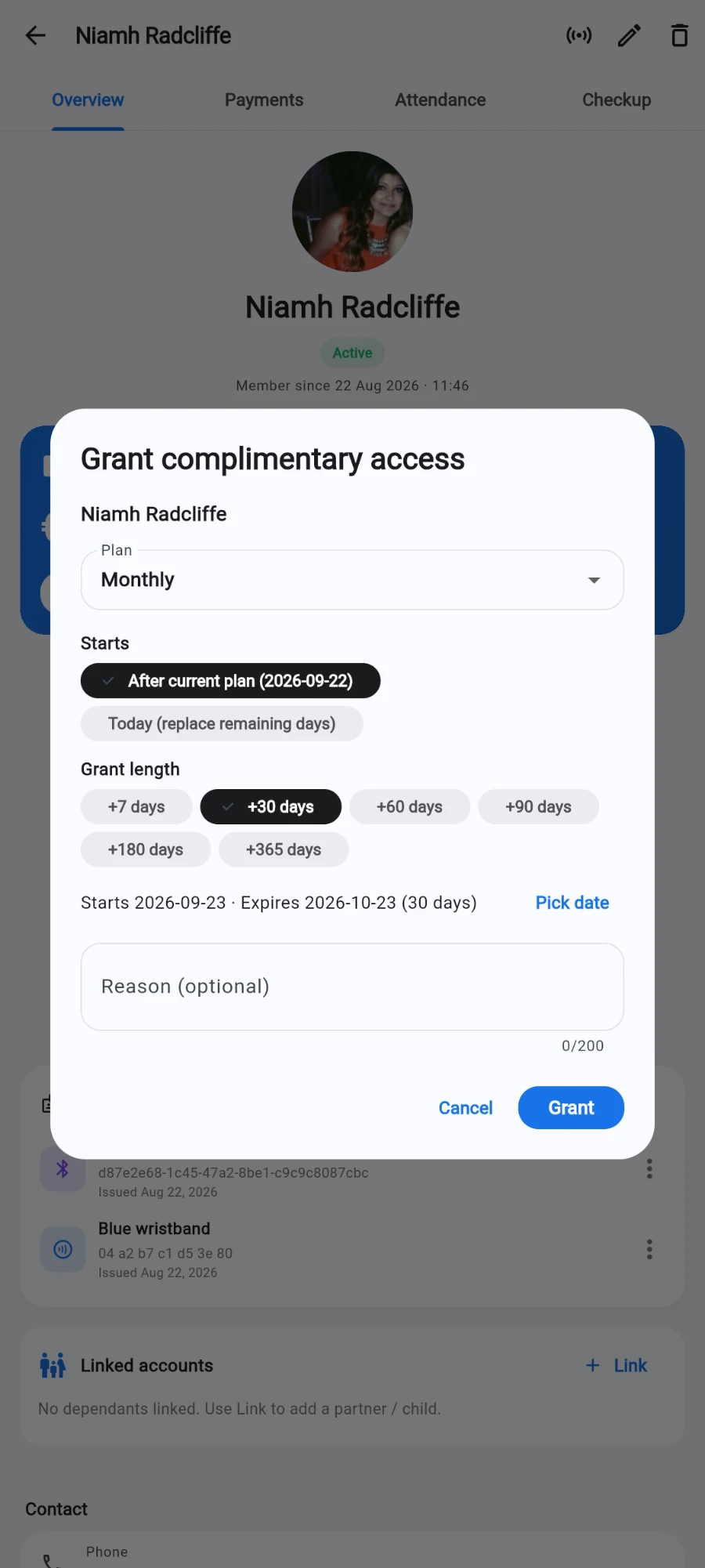
In the Grant complimentary access dialog, pick the Plan the member should be active on. Plan rules still apply — a gender-restricted plan is refused for a member who doesn't match.
-
Choose when it Starts: Today (replace remaining days), or after the current plan ends — the second option is shown with the current end date, and means a comp never eats a member's remaining paid days.
-
Set the Grant length with the quick presets — +7, +14, +30, +60, +90, +180 or +365 days — or tap Pick date to type an exact end date, useful when porting "97 days left" from an old system.
-
Add a Reason (optional). For cutovers, note the source system and date; for comps, note why. The reason lands in the audit log.
-
Tap Grant.
One-off visitor passes are a different tool: single-visit guest passes are issued and redeemed through the access-control side of the app, not through membership grants. Use complimentary grants only for people who are (or are becoming) members.
Taking a grant back
A comp granted by mistake — wrong member, wrong length, a favour that shouldn't have happened — is undone from the same place it shows up: the member's Payments tab, where every grant sits as a clearly labelled complimentary row you can tap to read in full.
Delete the complimentary row and Prism doesn't just remove the receipt — it revokes the days the grant added. A red Revoke complimentary days? dialog spells it out first: the member's access goes back to what it was before the grant, and if more time was added since, exactly the granted days come off the end. Choose Revoke days to proceed (or Keep to back out), pass the same authorisation check as any payment deletion, and the result toast confirms the outcome with the member's new end date — "Revoked 30 day(s) — access now ends [date]". The door hardware is updated to match.
What you should see
The member is active on the chosen plan with the chosen end date, and a confirmation appears. The grant shows up in their payments view clearly labelled as complimentary and non-revenue, so their history is complete without inflating your numbers.
If something goes wrong
- The grant is refused for a gendered plan — plan restrictions apply to comps too. Fix the member's recorded gender, or pick a mixed plan.
- Member had days left and they vanished — you picked Today (replace remaining days). Grant again using the after-current-plan option, extending past the intended end date to make them whole.
- Granted to the wrong member (or the wrong length) — delete the complimentary row from their Payments tab; the days are revoked and their end date rolls back (see above). Then grant afresh.
- Deleted a comp receipt and the toast warns no matching grant was found — an old grant from before revocation existed has no revocation record; the receipt is gone but the days stayed. Check the member's end date and correct it with a fresh grant or renewal if needed.
- Revenue report looks unchanged after granting — that's correct. Comps are deliberately invisible to revenue; check the member's activity log or the audit log for the record.
- The button isn't on the profile — your account lacks the renew permission; ask the owner.
Still stuck? Email hello@prismgym.com — include your gym name, the device, and a photo of what you see.